
Session-Based vs Term-Based Classes
Classes in the system can be configured as Session-Based or Term-Based, depending on how students should enroll.
Session-Based Classes
Session-based classes allow students to select and enroll in specific sessions rather than committing to the entire class duration. This works similarly to a holiday camp, where each day or session can be booked individually.
This format is useful for:
- Holiday programs
- Workshops
- Casual or drop-in sessions
- Short courses with flexible attendance
Students simply choose the sessions they wish to attend when enrolling.
Term-Based Classes
Term-based classes require students to enroll for the full term or defined date range. When a student registers, they are automatically booked into all sessions within that term.
This format is commonly used for:
- Weekly coaching programs
- School-term classes
- Structured courses that run over multiple weeks
Converting Between Class Types
If you need to change a class from Term-Based to Session-Based or Session-Based to Term-Based, you can do this using Bulk Actions in the Class Explorer.
Steps:
- Open Class Explorer.
- Highlight the class you want to modify (as shown below).
- Select Bulk Action from the menu.
- Choose one of the following options:
- Convert to Session Based Class – if the class should allow session-by-session enrollment.
- Convert to Term Based Class – if the class should require enrollment for the full term.
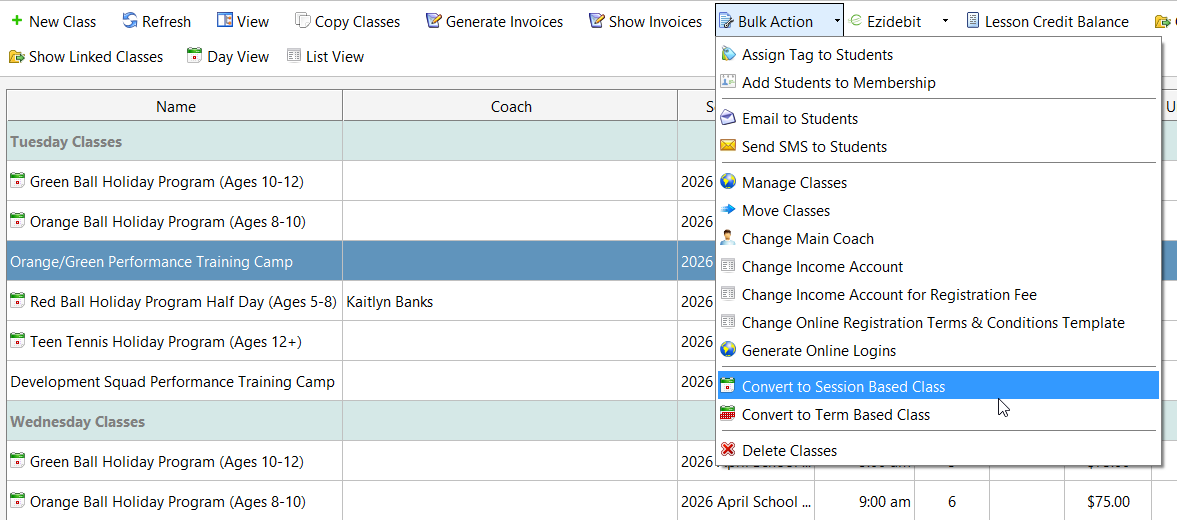
Once converted, the class will follow the selected enrollment format for future registrations.